
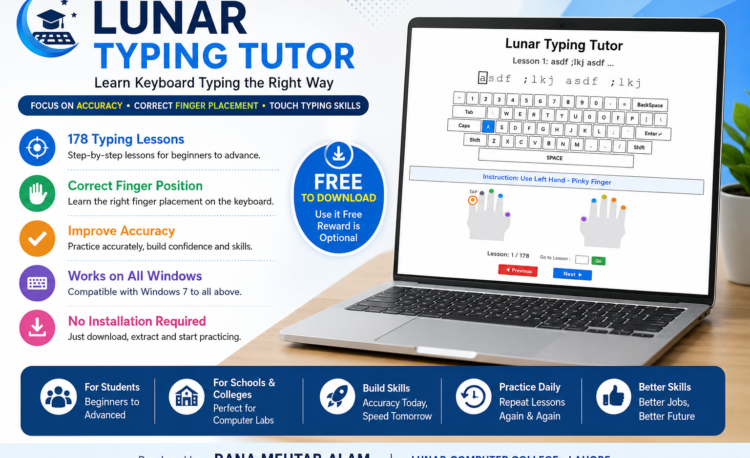
Typing is one of the most important basic computer skills for students, office workers, freelancers, and anyone who regularly uses a computer. To help beginners learn typing in a simple and practical way, Lunar Computer College has developed Lunar Typing Tutor — a free, easy‑to‑use typing practice software designed to build correct keyboard habits from the very beginning.
What Is Lunar Typing Tutor?
Lunar Typing Tutor is a lightweight Windows application developed by Rana Mehtab Alam at Lunar Computer College, Lahore. It is designed for beginners and anyone who wants to learn keyboard typing properly and gradually develop touch‑typing skills.
- 178 step‑by‑step lessons
- Focus on accuracy before speed
- Works on Windows 7 and later
- Completely free to download and use
Why Focus on Accuracy Before Speed?
Many beginners chase speed too early, which leads to bad habits like wrong finger use and constant keyboard looking. Lunar Typing Tutor follows this proven approach:
Correct Finger Position → Accuracy → Regular Practice → Touch Typing → Speed
👉 Build accuracy first. Speed will follow naturally.
Key Features
- Beginner‑Friendly Interface – Simple design, easy to start.
- Correct Finger Positioning – Shows which finger presses each key.
- Focus on Accuracy – Encourages correct typing habits.
- 178 Lessons – Progressive practice from basics to advanced.
- Repeat Practice – Reinforce muscle memory and confidence.
- Works on Windows 7+ – Runs on older PCs and modern systems.
- No Complicated Installation – Just download, extract, and open.
Who Can Use It?
- Students – Build a typing foundation before MS Office or programming.
- Beginners – Learn keyboard use the right way.
- Office Workers – Improve efficiency in daily tasks.
- Freelancers – Essential for data entry, writing, and online jobs.
- Schools & Institutes – Perfect for typing practice in labs.
Benefits of Touch Typing
- Save time and complete tasks faster
- Improve productivity in office and study work
- Reduce dependence on looking at the keyboard
- Build computer confidence
- Useful for education, freelancing, and career growth
System Requirements
- Operating System: Windows 7, 8, 10, 11
- Processor: Works from Intel Core 2 Duo onwards
- Package: ZIP file, lightweight application
- Installation: Download → Extract → Open → Start Typing
How to Use Lunar Typing Tutor
- Download & Extract the ZIP file.
- Open the Application to see lessons and finger guides.
- Follow the Typing Prompt (e.g.,
a s d f ; l k j). - Correct Mistakes using Backspace.
- Repeat Lessons until comfortable.
- Move to the next lesson using navigation controls.
- Practice regularly to build accuracy and speed.
⬇️ Download Lunar Typing Tutor – Free
Ready to start learning keyboard typing?
[⬇️ DOWNLOAD LUNAR TYPING TUTOR – FREE]
Support Free Education
Lunar Typing Tutor is free for everyone. If you find it useful, you can send a voluntary reward to support free educational software.
Scan QR Code to send support.

Account Name: Rana Mehtab Alam
Learn More at Lunar Computer College
Want to learn typing and practical computer skills in a friendly environment? Visit Lunar Computer College, Lahore, for training in:
- Typing
- MS Office
- Graphic Designing
- Video Editing
- Web Development
- Digital Marketing
- AI Tools
About Lunar Typing Tutor
- Developer: Rana Mehtab Alam
- Institute: Lunar Computer College – Lahore
- Lessons: 178
- Cost: Free
- OS: Windows 7 and later